> ## Documentation Index
> Fetch the complete documentation index at: https://docs.creator.fun/llms.txt
> Use this file to discover all available pages before exploring further.
# Referrals
> Invite friends to Creator.fun and earn Creator Points and SOL from every trade they make. There's no limit to how many people you can refer.
The referral program lets you earn a share of every trade your friends make on Creator.fun. When someone joins using your link and starts trading, you earn Creator Points from **100% of their trading volume** — as long as they keep trading, you keep earning. Head to [app.creator.fun/referral](https://app.creator.fun/referral) to find your referral link and track your earnings.
 ## How to refer a friend
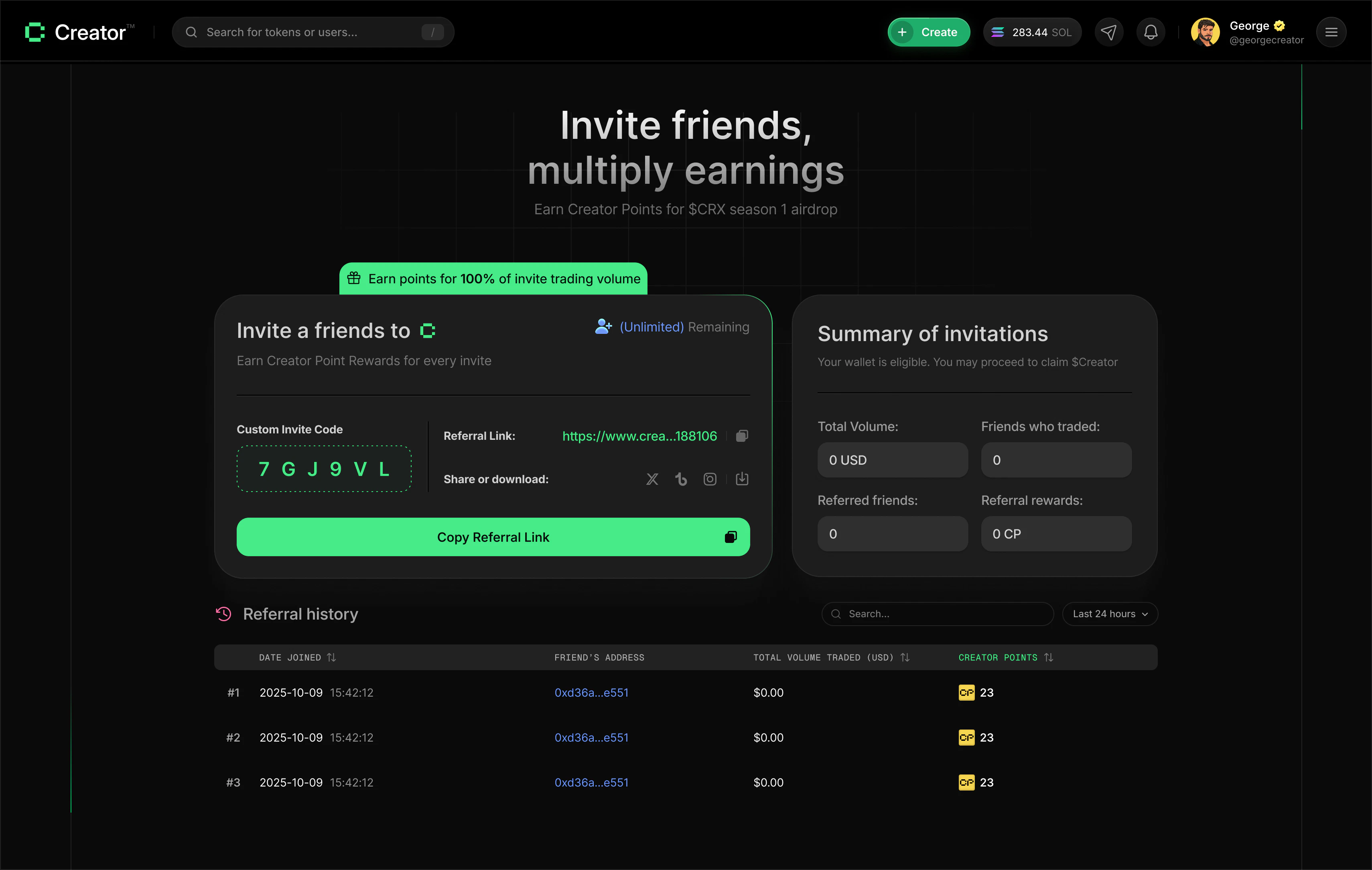
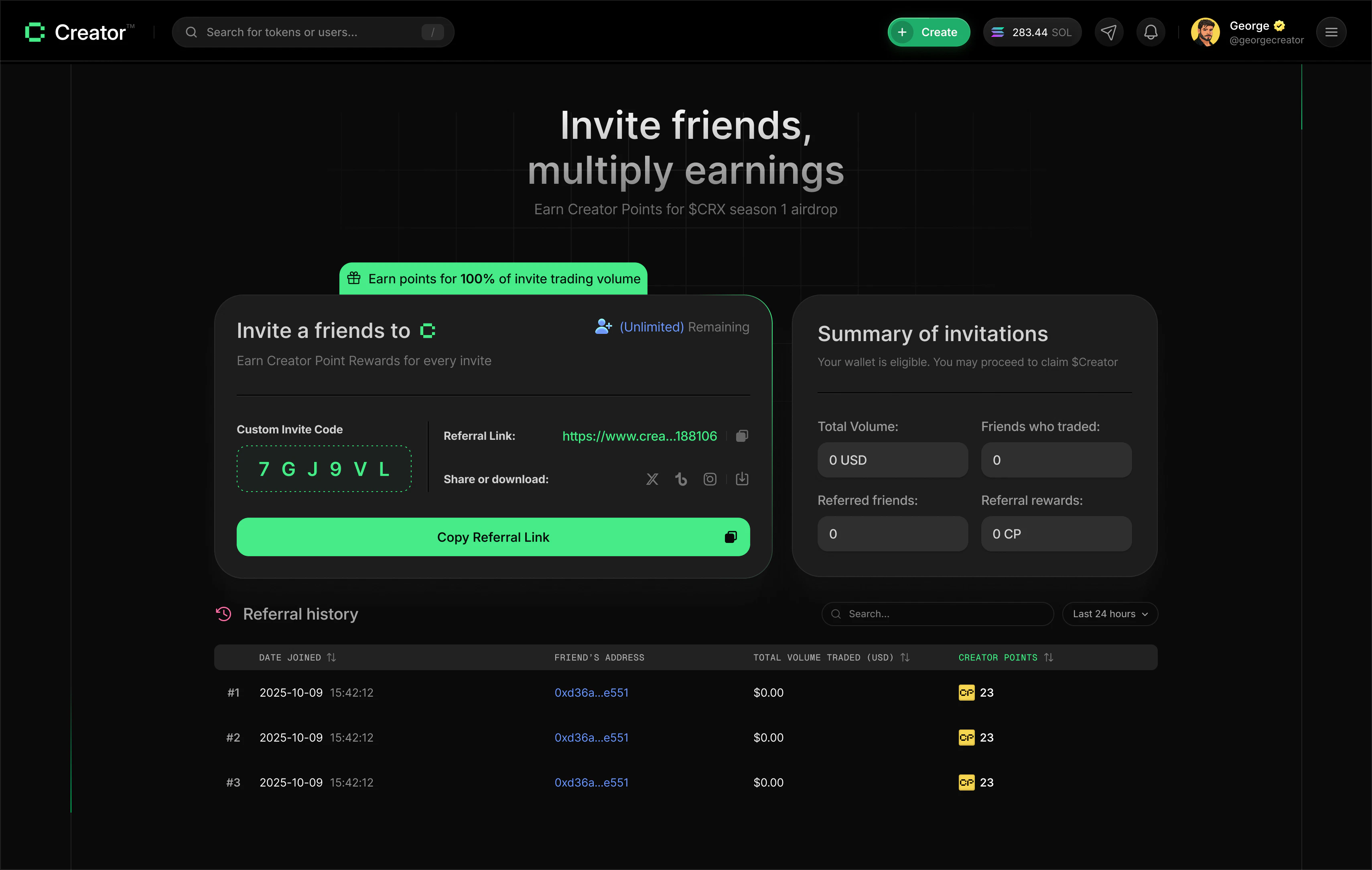
Visit [app.creator.fun/referral](https://app.creator.fun/referral). You'll see your unique referral link and invite code.
Click **Copy Referral Link** to copy the full URL to your clipboard. Your link looks like this:
```text theme={null}
https://app.creator.fun/?ref=yourRefId
```
Alternatively, click your **Custom Invite Code** to copy just the code. The code is the short alphanumeric string your friends can enter manually when signing up.
Send your link directly to friends, post it in a group chat, or share it on social media. You can use the built-in share buttons to post directly to Twitter/X, Instagram, or Telegram.
Once a friend signs up using your link and makes their first trade, they appear in your referral history. From that point on, their trading volume earns you Creator Points and SOL automatically.
Sharing your referral link on Twitter/X is one of the fastest ways to grow your referral network. Use the built-in Twitter share button on the referral page — it pre-fills a post with your link and the message "Join me on Creator — earn points and SOL with your friends."
## What you earn
For every friend who joins using your referral link:
* **Creator Points** — you earn CP based on 100% of your referred friend's trading volume. The more they trade, the more points you accumulate.
* **SOL** — a share of the platform fees generated by your referred friends' trades is distributed to you in SOL.
There is no limit on the number of friends you can refer, and your earnings scale directly with how active those friends are.
## Your referral summary
The **Summary of invitations** card on the right side of your referral dashboard shows an overview of your referral program performance:
| Metric | What it shows |
| ------------------ | -------------------------------------------------------------- |
| Total Volume | Combined trading volume generated by all your referred friends |
| Friends who traded | Number of referred friends who have made at least one trade |
| Referred friends | Total number of people who signed up using your link |
| Referral rewards | Total Creator Points you've earned from referrals |
## Referral history
Below the summary, the history table lists every person who joined using your referral link. You can search by user ID or referral code, filter the time range, and sort by different columns.
### Time range filter
Toggle between two views:
* **24h** — shows only friends who joined in the last 24 hours
* **All time** — shows your complete referral history
### Sort options
Click any column header to sort the table:
* **Creator Points** — sort by the Creator Points you've earned from each referred friend
* **Date Joined** — sort by when the friend signed up
* **Trading Volume** — sort by how much each referred friend has traded
Your referral link is unique to your account. Sharing someone else's link instead of your own means they get credit for the referral, not you. Always use the link from your own referral dashboard.
## How to refer a friend
Visit [app.creator.fun/referral](https://app.creator.fun/referral). You'll see your unique referral link and invite code.
Click **Copy Referral Link** to copy the full URL to your clipboard. Your link looks like this:
```text theme={null}
https://app.creator.fun/?ref=yourRefId
```
Alternatively, click your **Custom Invite Code** to copy just the code. The code is the short alphanumeric string your friends can enter manually when signing up.
Send your link directly to friends, post it in a group chat, or share it on social media. You can use the built-in share buttons to post directly to Twitter/X, Instagram, or Telegram.
Once a friend signs up using your link and makes their first trade, they appear in your referral history. From that point on, their trading volume earns you Creator Points and SOL automatically.
Sharing your referral link on Twitter/X is one of the fastest ways to grow your referral network. Use the built-in Twitter share button on the referral page — it pre-fills a post with your link and the message "Join me on Creator — earn points and SOL with your friends."
## What you earn
For every friend who joins using your referral link:
* **Creator Points** — you earn CP based on 100% of your referred friend's trading volume. The more they trade, the more points you accumulate.
* **SOL** — a share of the platform fees generated by your referred friends' trades is distributed to you in SOL.
There is no limit on the number of friends you can refer, and your earnings scale directly with how active those friends are.
## Your referral summary
The **Summary of invitations** card on the right side of your referral dashboard shows an overview of your referral program performance:
| Metric | What it shows |
| ------------------ | -------------------------------------------------------------- |
| Total Volume | Combined trading volume generated by all your referred friends |
| Friends who traded | Number of referred friends who have made at least one trade |
| Referred friends | Total number of people who signed up using your link |
| Referral rewards | Total Creator Points you've earned from referrals |
## Referral history
Below the summary, the history table lists every person who joined using your referral link. You can search by user ID or referral code, filter the time range, and sort by different columns.
### Time range filter
Toggle between two views:
* **24h** — shows only friends who joined in the last 24 hours
* **All time** — shows your complete referral history
### Sort options
Click any column header to sort the table:
* **Creator Points** — sort by the Creator Points you've earned from each referred friend
* **Date Joined** — sort by when the friend signed up
* **Trading Volume** — sort by how much each referred friend has traded
Your referral link is unique to your account. Sharing someone else's link instead of your own means they get credit for the referral, not you. Always use the link from your own referral dashboard.