> ## Documentation Index
> Fetch the complete documentation index at: https://docs.creator.fun/llms.txt
> Use this file to discover all available pages before exploring further.
# Your profile
> View and manage your Creator.fun profile — your stats, holdings, trade history, and rewards all in one place.
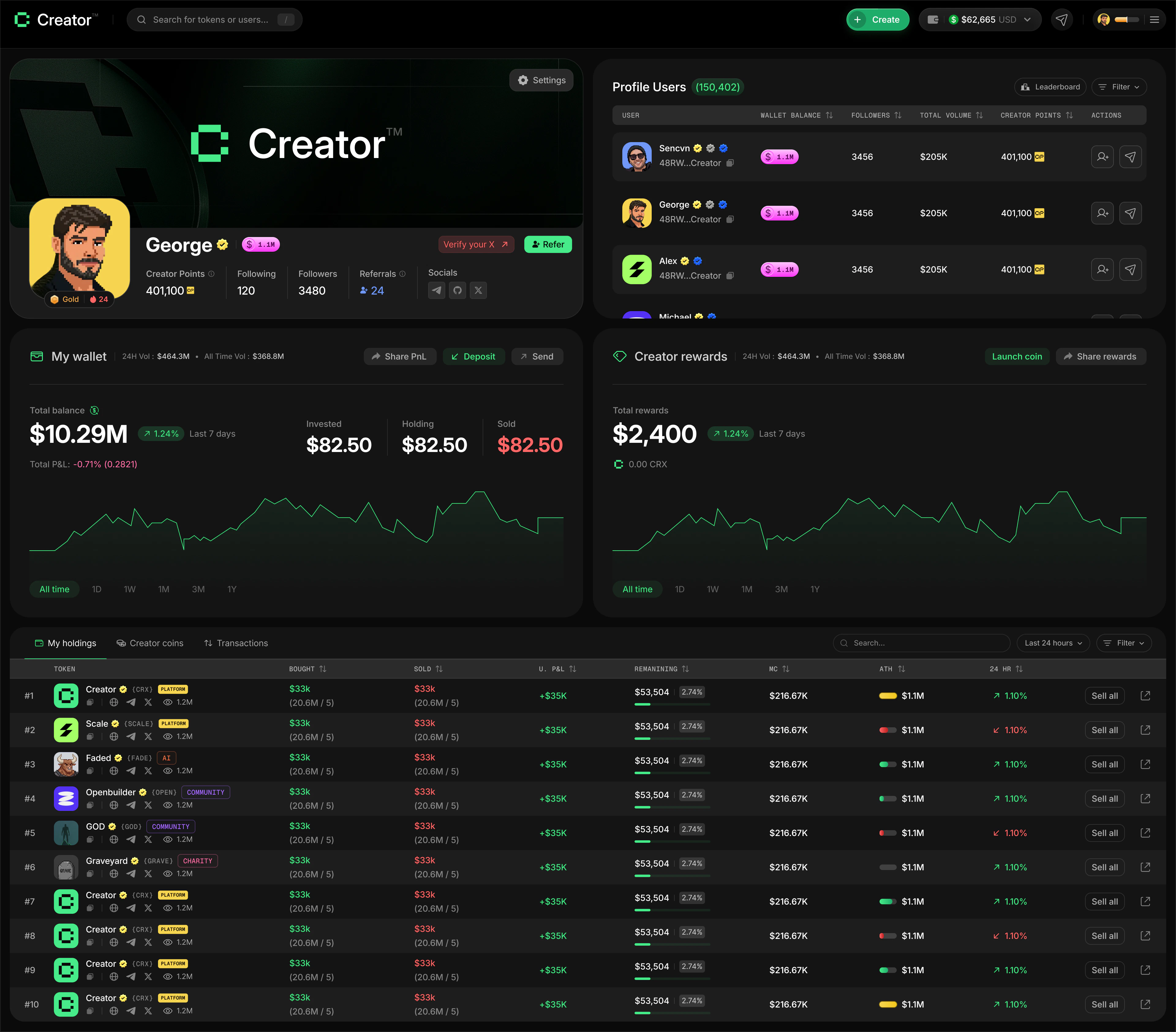
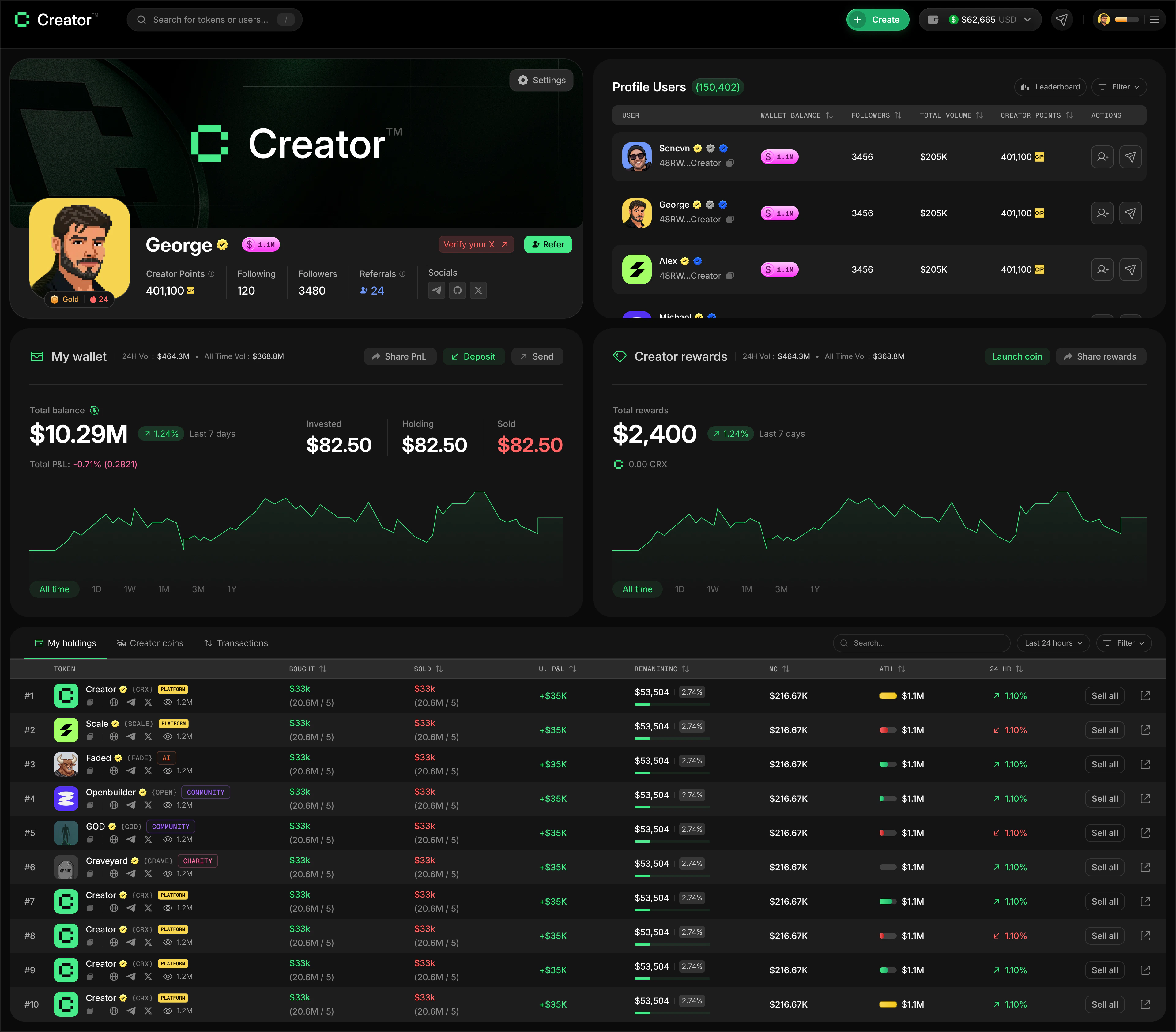
Your profile is your home base on Creator.fun. It shows who you are, what you've built, and how you're performing as a trader. Head to [app.creator.fun/profile](https://app.creator.fun/profile) to view it.
 ## Profile card
At the top of your profile, you'll find your profile card. It displays:
* **Banner image** — a full-width header image you can customize
* **Avatar** — your profile picture, pulled from your linked Twitter/X account or uploaded manually
* **Username** — your Twitter/X handle, shown once you connect your account
* **Wallet address** — your Solana wallet address (truncated, with a copy button)
* **Following / Followers** — the number of creators you follow and who follow you
* **Created coins** — the total number of coins you've launched on Creator.fun
* **Wallet balance** — the total value of your SOL and token holdings in USD
Connect your Twitter/X account to display your username and earn a verified badge (yellow checkmark) on your profile. Without it, you'll appear as "New Creator" and a **Verify Your X (Twitter)** prompt will show in the top corner of your banner.
### Connecting Twitter/X
Go to [app.creator.fun/profile](https://app.creator.fun/profile). If you haven't connected Twitter/X yet, you'll see a **Verify Your X (Twitter)** prompt in the top-right corner of your banner.
Click the **Verify Your X (Twitter)** prompt. A Twitter/X OAuth window will open.
Log in to your Twitter/X account and approve the authorization request.
Once connected, your Twitter/X handle becomes your username and a verified badge appears next to your name.
### Updating your profile picture and banner
Click the **Settings** button in the top-left corner of your banner image.
Click **Select file** under your avatar to choose a new image. JPEG or PNG, up to 500×500px. You can crop the image before saving.
In the **Edit Banner Image** section, drag and drop an image or click **Select file**. JPEG or PNG, up to 1500×500px, max 2MB. You can crop the banner to fit.
Click **Save** to apply both updates to your profile.
## Following creators
You can follow other traders and creators on Creator.fun. When you follow someone, their activity is easier to track and your **Following** count updates on your profile card.
To follow a creator, visit their public profile and click the **Follow** button. Click **Unfollow** to remove them from your following list.
## Rewards and streak
Below your username, you'll find two quick stats that reflect your activity level:
* **Rewards multiplier** — shown as "1.0x Rewards", "1.3x Rewards", etc. A higher multiplier means you earn Creator Points faster on every trade and referral. Your multiplier is determined by your **badge tier**, which is based on how much SOL you hold in your Creator.fun wallet (see [Creator Points](/profile/creator-points) for the full tier table).
* **Days Streak** — the number of consecutive days you've met the minimum trading requirement. The streak counter shows a fire icon and your current count.
Maintaining a streak requires at least **\$1,000 in trading volume per day**. Missing a day resets your streak to zero.
Your Creator Points earned during Season 1 will be redeemed for the **Season 1 Creator Airdrop** at the end of the season. See the [Creator Points](/profile/creator-points) page for how earning works.
## Portfolio charts
Two live charts give you a visual overview of your financial activity:
* **My Wallet** — shows your total SOL balance over time, with 24H balance change and total P\&L. Use the time filters (1D, 1W, 1M, 3M, 1Y, All Time) to zoom in or out.
* **Creator Rewards** — shows your cumulative CRX rewards earned over time, with a 1H rewards change indicator.
You can also fund your wallet, send, or receive SOL directly from the **My Wallet** chart section.
## Trading stats
The **Wallet Balance** section below the charts shows an aggregate breakdown of your trading performance. You can filter by time period using the toggle buttons: All Time, 1D, 7D, 14D, or 30D.
| Stat | What it means |
| ----------------- | -------------------------------------------- |
| Invested | Total SOL you've spent on tokens |
| Remaining | SOL value still held in open positions |
| Sold | Total SOL you've received from selling |
| Change in P\&L | Your profit or loss for the selected period |
| Tokens bought | Total number of tokens purchased |
| Token winrate | Percentage of trades that were profitable |
| AVG hold | Average time you hold a token before selling |
| Token last traded | Most recent token you traded |
## Profile tables
The bottom of your profile has three tabs for drilling into your activity:
Shows all creator coins currently in your wallet, including how much you hold and the current value. Use the **Search** bar to find a specific token, and filter by **Last 24 Hours**, **Last 7 Days**, or **All Time**.
Lists all coins you have launched on Creator.fun. This tab is visible to anyone who views your public profile.
A full history of every trade you've made — buys, sells, and timestamps. Filter by time range or search by token name.
## Profile card
At the top of your profile, you'll find your profile card. It displays:
* **Banner image** — a full-width header image you can customize
* **Avatar** — your profile picture, pulled from your linked Twitter/X account or uploaded manually
* **Username** — your Twitter/X handle, shown once you connect your account
* **Wallet address** — your Solana wallet address (truncated, with a copy button)
* **Following / Followers** — the number of creators you follow and who follow you
* **Created coins** — the total number of coins you've launched on Creator.fun
* **Wallet balance** — the total value of your SOL and token holdings in USD
Connect your Twitter/X account to display your username and earn a verified badge (yellow checkmark) on your profile. Without it, you'll appear as "New Creator" and a **Verify Your X (Twitter)** prompt will show in the top corner of your banner.
### Connecting Twitter/X
Go to [app.creator.fun/profile](https://app.creator.fun/profile). If you haven't connected Twitter/X yet, you'll see a **Verify Your X (Twitter)** prompt in the top-right corner of your banner.
Click the **Verify Your X (Twitter)** prompt. A Twitter/X OAuth window will open.
Log in to your Twitter/X account and approve the authorization request.
Once connected, your Twitter/X handle becomes your username and a verified badge appears next to your name.
### Updating your profile picture and banner
Click the **Settings** button in the top-left corner of your banner image.
Click **Select file** under your avatar to choose a new image. JPEG or PNG, up to 500×500px. You can crop the image before saving.
In the **Edit Banner Image** section, drag and drop an image or click **Select file**. JPEG or PNG, up to 1500×500px, max 2MB. You can crop the banner to fit.
Click **Save** to apply both updates to your profile.
## Following creators
You can follow other traders and creators on Creator.fun. When you follow someone, their activity is easier to track and your **Following** count updates on your profile card.
To follow a creator, visit their public profile and click the **Follow** button. Click **Unfollow** to remove them from your following list.
## Rewards and streak
Below your username, you'll find two quick stats that reflect your activity level:
* **Rewards multiplier** — shown as "1.0x Rewards", "1.3x Rewards", etc. A higher multiplier means you earn Creator Points faster on every trade and referral. Your multiplier is determined by your **badge tier**, which is based on how much SOL you hold in your Creator.fun wallet (see [Creator Points](/profile/creator-points) for the full tier table).
* **Days Streak** — the number of consecutive days you've met the minimum trading requirement. The streak counter shows a fire icon and your current count.
Maintaining a streak requires at least **\$1,000 in trading volume per day**. Missing a day resets your streak to zero.
Your Creator Points earned during Season 1 will be redeemed for the **Season 1 Creator Airdrop** at the end of the season. See the [Creator Points](/profile/creator-points) page for how earning works.
## Portfolio charts
Two live charts give you a visual overview of your financial activity:
* **My Wallet** — shows your total SOL balance over time, with 24H balance change and total P\&L. Use the time filters (1D, 1W, 1M, 3M, 1Y, All Time) to zoom in or out.
* **Creator Rewards** — shows your cumulative CRX rewards earned over time, with a 1H rewards change indicator.
You can also fund your wallet, send, or receive SOL directly from the **My Wallet** chart section.
## Trading stats
The **Wallet Balance** section below the charts shows an aggregate breakdown of your trading performance. You can filter by time period using the toggle buttons: All Time, 1D, 7D, 14D, or 30D.
| Stat | What it means |
| ----------------- | -------------------------------------------- |
| Invested | Total SOL you've spent on tokens |
| Remaining | SOL value still held in open positions |
| Sold | Total SOL you've received from selling |
| Change in P\&L | Your profit or loss for the selected period |
| Tokens bought | Total number of tokens purchased |
| Token winrate | Percentage of trades that were profitable |
| AVG hold | Average time you hold a token before selling |
| Token last traded | Most recent token you traded |
## Profile tables
The bottom of your profile has three tabs for drilling into your activity:
Shows all creator coins currently in your wallet, including how much you hold and the current value. Use the **Search** bar to find a specific token, and filter by **Last 24 Hours**, **Last 7 Days**, or **All Time**.
Lists all coins you have launched on Creator.fun. This tab is visible to anyone who views your public profile.
A full history of every trade you've made — buys, sells, and timestamps. Filter by time range or search by token name.