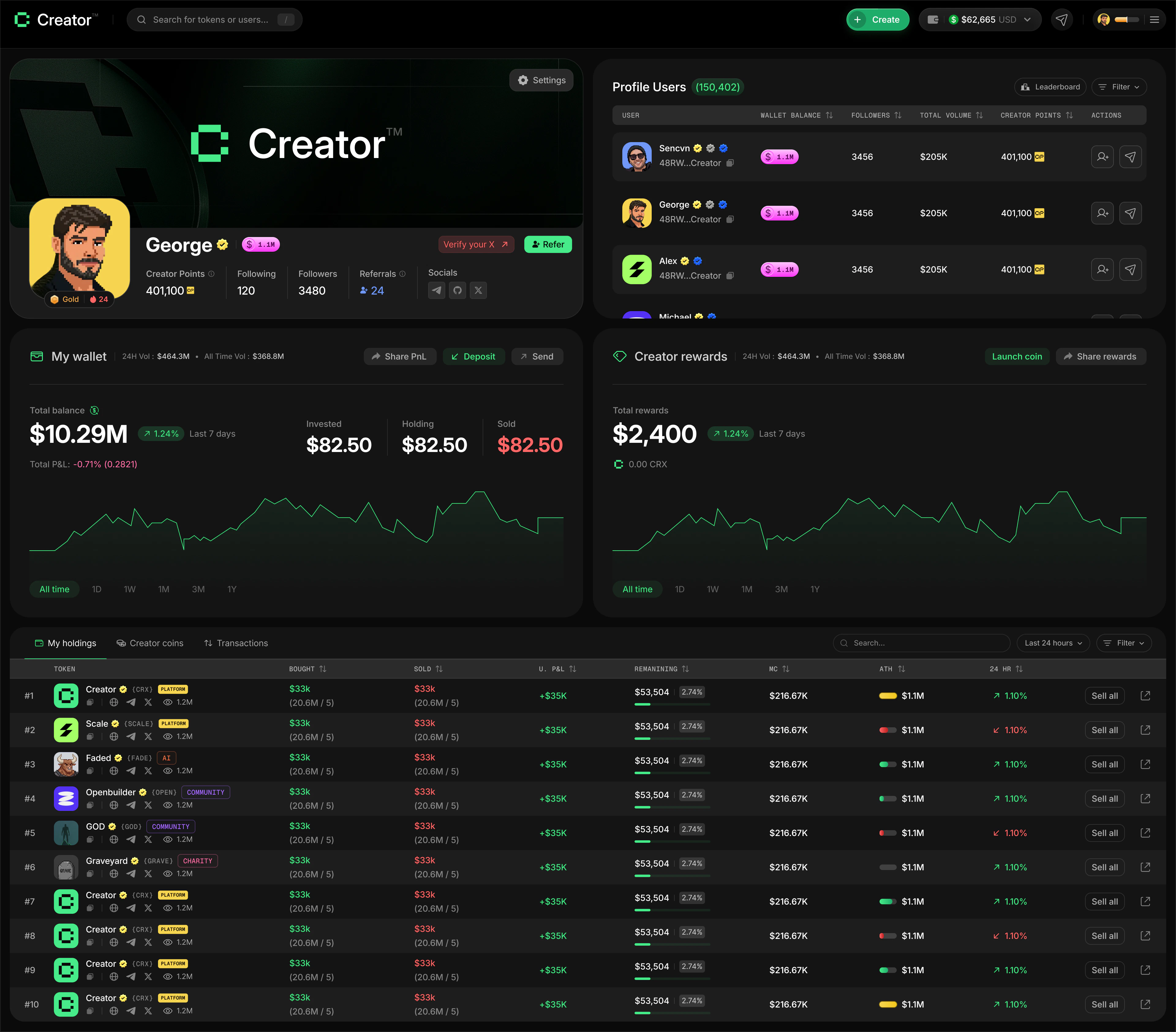
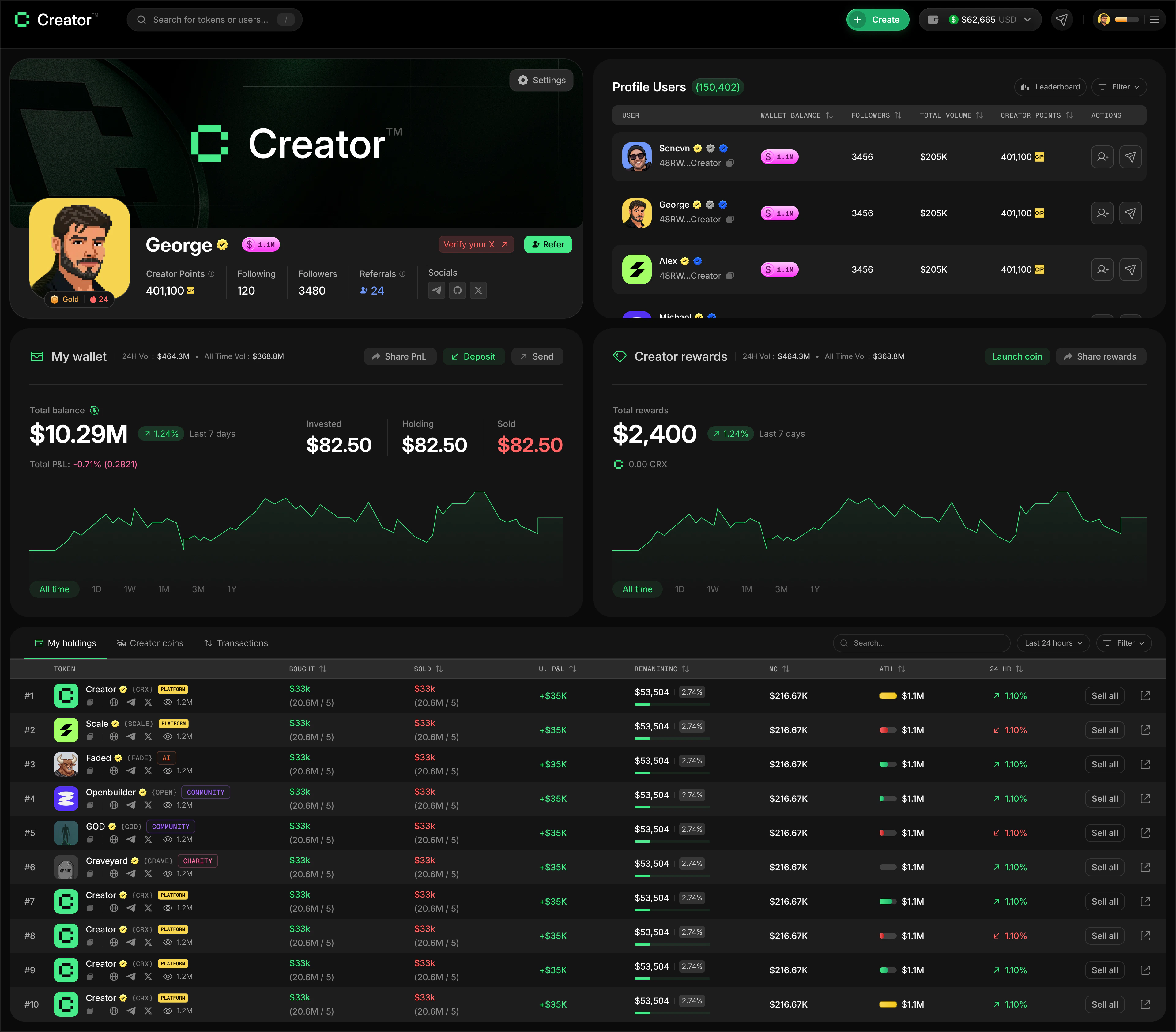
Profile card
At the top of your profile, you’ll find your profile card. It displays:- Banner image — a full-width header image you can customize
- Avatar — your profile picture, pulled from your linked Twitter/X account or uploaded manually
- Username — your Twitter/X handle, shown once you connect your account
- Wallet address — your Solana wallet address (truncated, with a copy button)
- Following / Followers — the number of creators you follow and who follow you
- Created coins — the total number of coins you’ve launched on Creator.fun
- Wallet balance — the total value of your SOL and token holdings in USD
Connecting Twitter/X
1
Open your profile
Go to app.creator.fun/profile. If you haven’t connected Twitter/X yet, you’ll see a Verify Your X (Twitter) prompt in the top-right corner of your banner.
2
Start the connection
Click the Verify Your X (Twitter) prompt. A Twitter/X OAuth window will open.
3
Authorize the app
Log in to your Twitter/X account and approve the authorization request.
4
Confirmation
Once connected, your Twitter/X handle becomes your username and a verified badge appears next to your name.
Updating your profile picture and banner
1
Open Settings
Click the Settings button in the top-left corner of your banner image.
2
Upload a profile picture
Click Select file under your avatar to choose a new image. JPEG or PNG, up to 500×500px. You can crop the image before saving.
3
Upload a banner image
In the Edit Banner Image section, drag and drop an image or click Select file. JPEG or PNG, up to 1500×500px, max 2MB. You can crop the banner to fit.
4
Save changes
Click Save to apply both updates to your profile.
Following creators
You can follow other traders and creators on Creator.fun. When you follow someone, their activity is easier to track and your Following count updates on your profile card. To follow a creator, visit their public profile and click the Follow button. Click Unfollow to remove them from your following list.Rewards and streak
Below your username, you’ll find two quick stats that reflect your activity level:- Rewards multiplier — shown as “1.0x Rewards”, “1.3x Rewards”, etc. A higher multiplier means you earn Creator Points faster on every trade and referral. Your multiplier is determined by your badge tier, which is based on how much SOL you hold in your Creator.fun wallet (see Creator Points for the full tier table).
- Days Streak — the number of consecutive days you’ve met the minimum trading requirement. The streak counter shows a fire icon and your current count.
Maintaining a streak requires at least $1,000 in trading volume per day. Missing a day resets your streak to zero.
Your Creator Points earned during Season 1 will be redeemed for the Season 1 Creator Airdrop at the end of the season. See the Creator Points page for how earning works.
Portfolio charts
Two live charts give you a visual overview of your financial activity:- My Wallet — shows your total SOL balance over time, with 24H balance change and total P&L. Use the time filters (1D, 1W, 1M, 3M, 1Y, All Time) to zoom in or out.
- Creator Rewards — shows your cumulative CRX rewards earned over time, with a 1H rewards change indicator.
Trading stats
The Wallet Balance section below the charts shows an aggregate breakdown of your trading performance. You can filter by time period using the toggle buttons: All Time, 1D, 7D, 14D, or 30D.Profile tables
The bottom of your profile has three tabs for drilling into your activity:- My Holdings
- Creator Coins
- Transactions
Shows all creator coins currently in your wallet, including how much you hold and the current value. Use the Search bar to find a specific token, and filter by Last 24 Hours, Last 7 Days, or All Time.